College Timetable Software for Faculty and Departments
Plan lecture timetables for every programme, semester and section, keep faculty from being double-booked, and give every lecturer and student group a live timetable link.
Used by 350+ schools and institutions · 14-day free trial · No credit card
What is college timetable software?
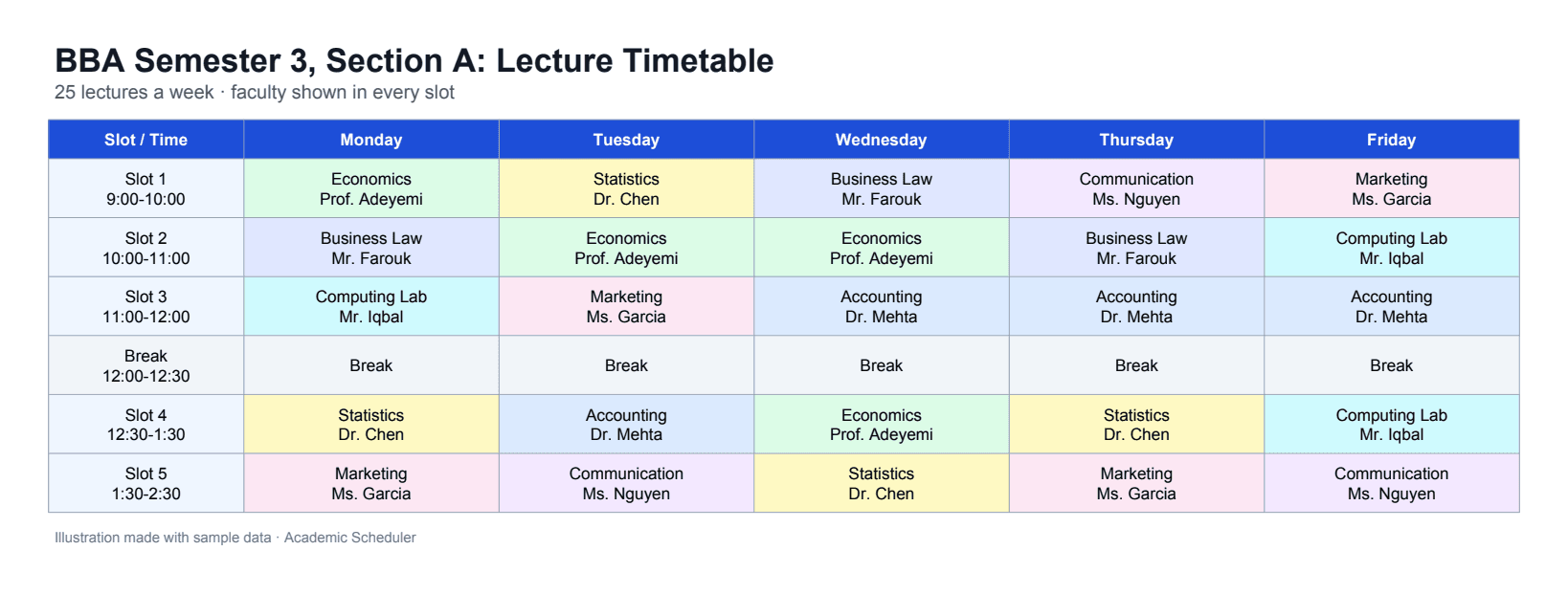
College timetable software plans which lecturer teaches which course to which student group in each time slot of the week, and checks every slot so no faculty member is booked twice. It replaces the spreadsheet that departments pass around before each semester.
In Academic Scheduler, your time slots are periods, your programmes, semesters or sections are classes, and your faculty are teachers with the courses they can teach and the days and slots they're available. Colleges with several campuses can be run from one organisation login.
Why college timetabling is hard
Visiting and part-time faculty
Lecturers who come in on certain days only make every slot harder to fill.
Faculty shared across programmes
One lecturer teaching three sections means one change can break three timetables.
Weekly lecture loads
Each course needs its contact hours per week, and nobody wants to count them by hand.
Several campuses
Head office can't see or support each campus's timetable without asking for files.
Built for lecture timetables
Faculty clash blocking and availability
Record each lecturer's courses and the days and slots they're available. While you build a section's week, faculty already lecturing in that slot are greyed out and each course shows its weekly lecture count.
- Faculty double-booking blocked
- Weekly lecture limits per course
- Availability by day and slot
- Courses limited to qualified faculty
Multi-campus control from one login
With an organisation account, head office signs in once and opens any campus's full dashboard from a dropdown. Each campus keeps its own data and logins.
- Switch campuses without logging out
- Each campus keeps its own data
- Set up by our team on request
Share, print and export
Send every teacher and class a password-protected live link or QR code that always shows the latest timetable, or download a print-ready PDF or an editable Excel file.
- Password-protected, read-only share links and QR codes
- PDF (A4 landscape) and Excel (.xlsx) downloads
- Class-wise and teacher-wise views, horizontal or vertical
Cover and exam timetables
When a lecturer is absent, see who is free in each of their slots and email the cover. Plan mid-term and final exam timetables within their date ranges and download them as PDF.
- Free faculty listed per slot
- Exam types with date ranges
- Printable exam timetables
One workspace per academic year
Each academic session (for example 2026-27) keeps its own classes, teachers, subjects and timetables. Start the new year by copying last year's setup, and past years stay safe and read-only.
- Copy last year's setup in minutes
- Past sessions kept read-only for reference
- Switch between sessions any time
Set up a semester timetable
- 1
Define time slots
Add your lecture slots and breaks for each teaching day.
- 2
Add courses and faculty
Enter courses, then faculty with the courses they teach and their availability.
- 3
Create sections
Add each programme, semester or section with its courses, faculty and weekly lectures.
- 4
Build and publish
Fill each section's week, check the faculty view, then share links or export PDF and Excel.
Department spreadsheets vs college timetable software
| Task | Spreadsheets | Academic Scheduler |
|---|---|---|
| Faculty double-booking | Spotted after publishing | Blocked while you build |
| Visiting faculty days | Remembered by the coordinator | Recorded as availability |
| Lecture hours per course | Counted by hand | Live count per section |
| Faculty timetables | Compiled separately | Generated automatically |
| Several campuses | Files emailed to head office | One organisation login |
Is it right for you?
A great fit if you…
- plan fixed sections or batches per programme and semester
- juggle part-time and visiting faculty
- run more than one campus
- want lecturers and students to see the live timetable on their phones
Not the right tool if you need…
- lecture hall and lab room allocation
- student course registration or individual elective choices
- syncing with a student information system (SIS)
Frequently Asked Questions
More solutions
Plan next semester's timetable without clashes
Set up your faculty and sections free for 14 days. No credit card needed.
14-day free trial · No credit card · Cancel anytime