Arrange Substitute Teachers in Minutes, Not Phone Calls
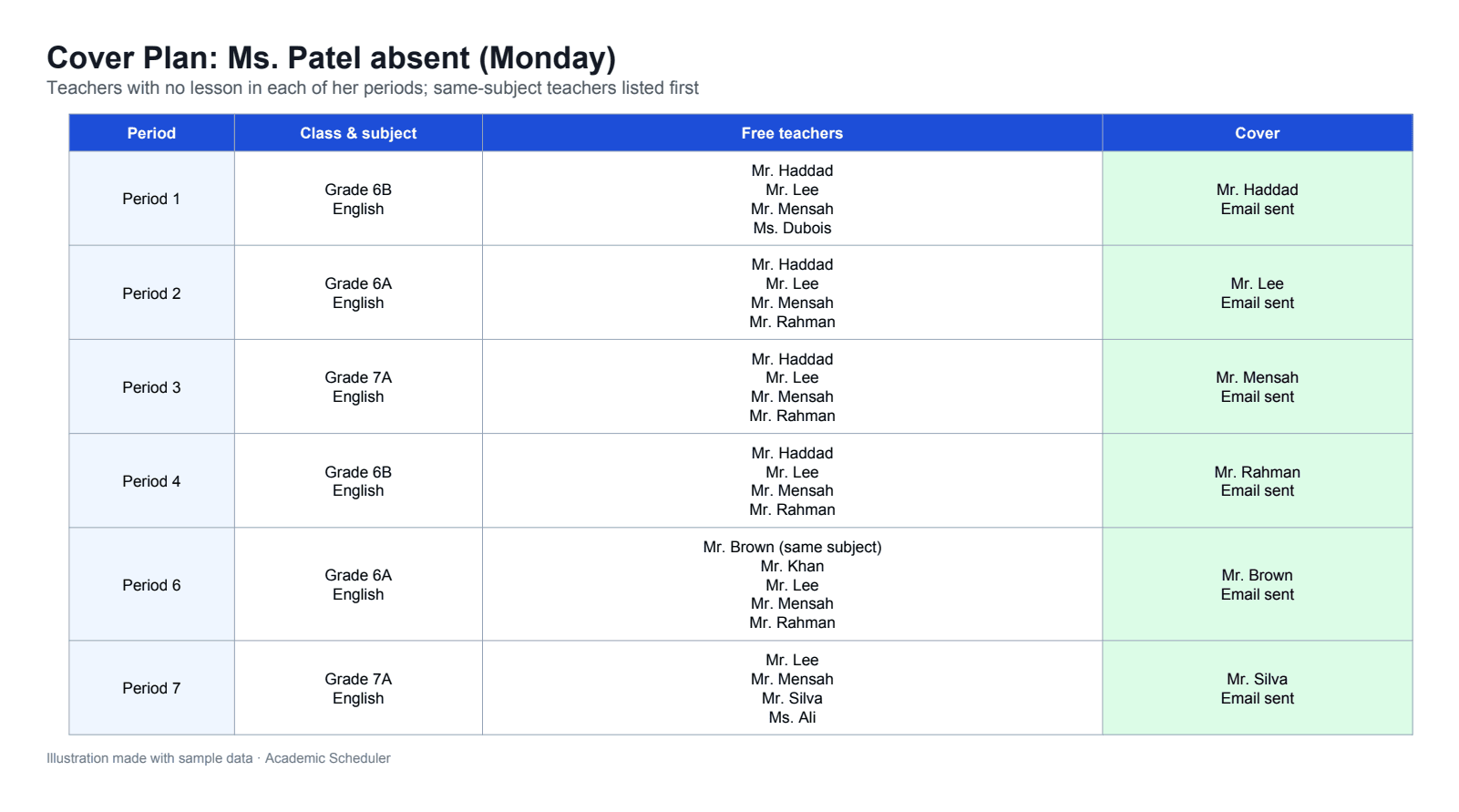
When a teacher is absent, pick them and the day. Academic Scheduler lists who is free in each of their periods, highlights teachers of the same subject, and emails the substitute the details.
Used by 350+ schools and institutions · 14-day free trial · No credit card
What is substitution management?
Substitution management is how a school covers lessons when a teacher is absent: finding a free teacher for each affected period, telling them where to go, and keeping classes supervised. Done by hand, it usually means checking printed timetables and phoning around before first period.
Academic Scheduler reads your timetable to find teachers who have no lesson in each period the absent teacher teaches, puts same-subject teachers first, and sends the chosen substitute an email with the class, subject, day and period. The weekly timetable itself stays unchanged.
Why morning cover is so stressful
Who is actually free?
Finding a free teacher means scanning every timetable for each period.
Wrong-subject cover
In a rush, a class gets whoever is free rather than someone who teaches the subject.
Lost messages
Cover details passed on by phone or a note get missed or misremembered.
Same teachers every time
Without a clear view, cover falls on the same few people.
Everything you need to cover a lesson
Free teachers, period by period
Choose the absent teacher and the day (or Today). For each of their periods you see every teacher with no lesson at that time.
- Works from your live timetable
- One list per affected period
- Today button for same-day cover
Same-subject teachers first
Teachers who teach the same subject are highlighted, so classes keep learning instead of just being supervised.
- Subject match highlighted
- Better continuity for students
- Fair choice from the full free list
Email the substitute in one click
Send the chosen teacher an email with the class, subject, day and period. The button appears for teachers who have an email address saved.
- Class, subject, day and period included
- No phone tag
- A written record for the teacher
See the day at a glance
The daily timetable shows the whole school's day class-wise or teacher-wise, in a horizontal or vertical layout, so you can check the day before and after arranging cover.
- Class-wise and teacher-wise views
- Horizontal or vertical layout
- Colour filter and search
Know who has capacity
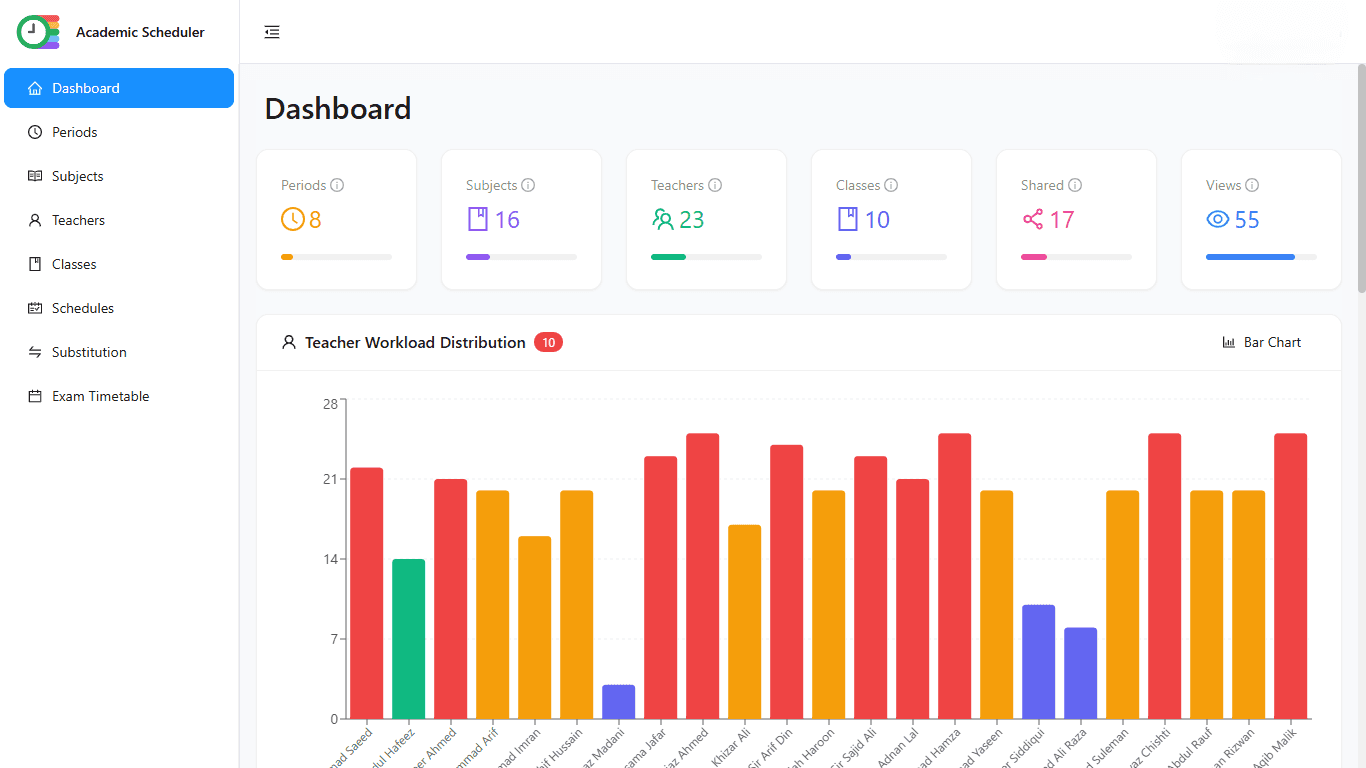
The workload chart on the dashboard shows each teacher's weekly periods, so you can spread cover fairly across staff.
- Weekly periods per teacher
- Bar, line, area and pie charts
Cover an absence in four steps
- 1
Pick the teacher
Open Substitution and choose the absent teacher.
- 2
Pick the day
Choose the day, or press Today for same-day cover.
- 3
Choose cover
For each period, pick a free teacher; same-subject teachers are highlighted.
- 4
Send the email
Email the substitute the class, subject, day and period in one click.
Manual cover vs substitution management
| Task | Manual | Academic Scheduler |
|---|---|---|
| Finding free teachers | Scan every timetable | Listed per period automatically |
| Subject match | Whoever answers the phone | Same-subject teachers highlighted |
| Telling the substitute | Calls, notes, messages | One-click email with all details |
| Fair distribution | Same people every time | Workload chart to guide choices |
Is it right for you?
A great fit if you…
- cover absences most mornings
- want subject teachers covering their own subject where possible
- want cover details in writing
- already build or plan to build your timetable in Academic Scheduler
Not the right tool if you need…
- booking external supply teachers or agencies
- leave requests, approvals or absence tracking
- automatic SMS or app notifications
Frequently Asked Questions
More solutions
Make tomorrow's cover a two-minute job
Build your timetable once and find free, same-subject teachers whenever someone is absent.
14-day free trial · No credit card · Cancel anytime