Teacher Scheduling Software That Ends Double-Booking
Record what each teacher can teach and when they're available. Academic Scheduler keeps every teacher in one place at a time, shows their weekly load, and sends each of them a live timetable.
Used by 350+ schools and institutions · 14-day free trial · No credit card
What is teacher scheduling software?
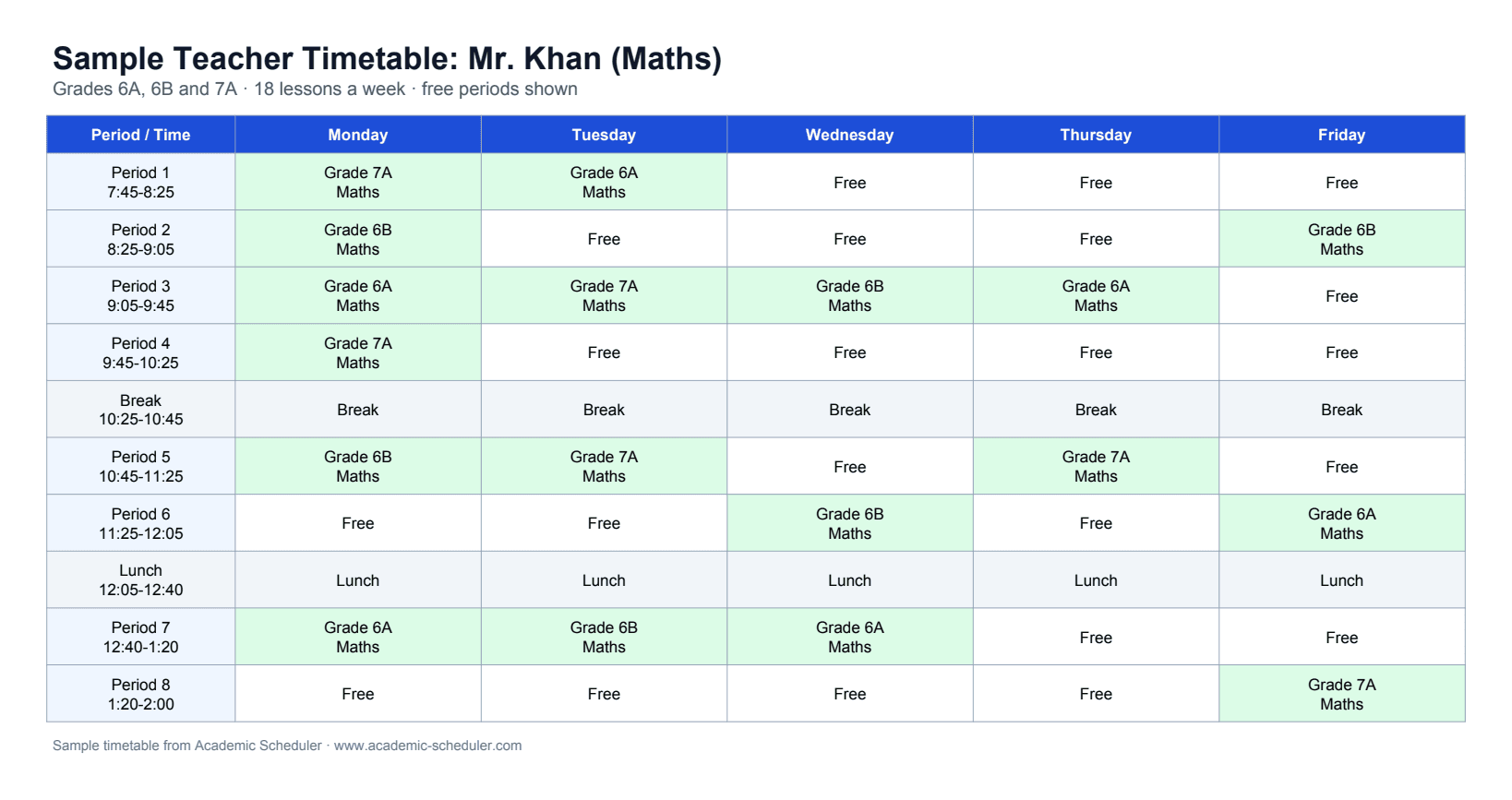
Teacher scheduling software assigns teachers to classes and periods across the week so that no teacher is booked twice, each teacher only teaches their own subjects, and the weekly load stays fair. It also produces each teacher's personal timetable from the school timetable.
In Academic Scheduler, every teacher has the subjects they can teach and the days and periods they're available. While you build a class's timetable, teachers who are already teaching in that period are greyed out, and every teacher's timetable and weekly workload update automatically.
Why scheduling teachers by hand goes wrong
Double-booked teachers
A teacher shared across classes ends up in two rooms at once and nobody notices until the bell rings.
Part-time availability
Teachers who only work certain days get lessons on their day off.
Uneven workloads
Some teachers end up with far more periods than others, and it's hard to see without counting.
Outdated personal timetables
Every change means re-making and re-sending each teacher's copy.
Built around your teachers
No teacher in two places at once
When you pick a period for a class, teachers already teaching in that period are greyed out with the class they're teaching, so double-booking can't happen.
- Busy teachers blocked while you edit
- See where a busy teacher is teaching
- More than one teacher per period for co-teaching
Subjects and availability per teacher
Each teacher profile lists the subjects they can teach and the days and periods they're available, so the right teachers are offered for each lesson.
- Teachers limited to their own subjects
- Availability by day and period
- Ideal for part-time and visiting staff
See every teacher's workload
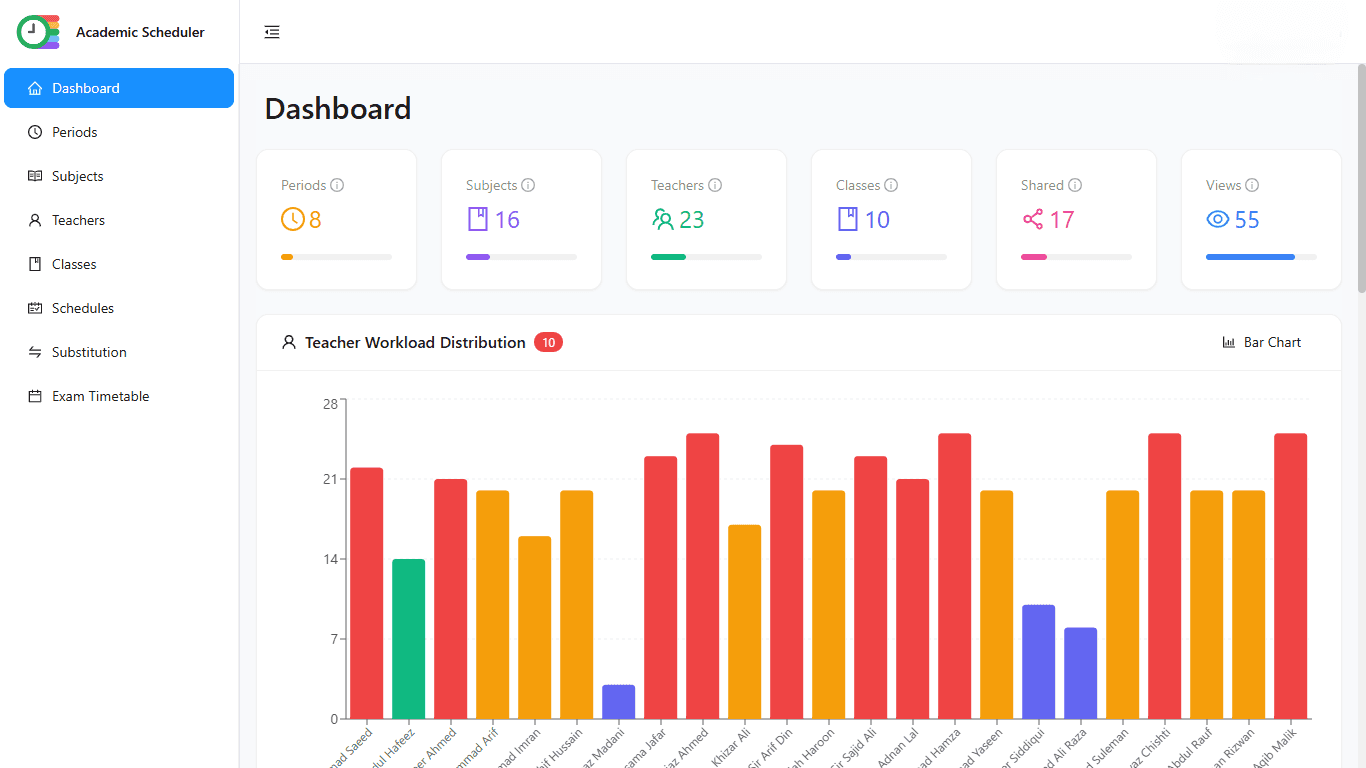
The dashboard charts each teacher's periods per week as a bar, line, area or pie chart, so overloaded and under-used teachers stand out before the term starts.
- Weekly periods per teacher
- Four chart types
- Spot imbalances early
A personal timetable for every teacher
Teacher timetables are generated from the class timetables. Share each one as a password-protected live link or QR code, or download it as PDF or Excel.
- Always in sync with class timetables
- Live links that update themselves
- PDF and Excel downloads
Cover absent teachers in minutes
Pick the absent teacher and the day. For each of their periods you see which teachers are free, with teachers of the same subject highlighted, and you can email the chosen substitute the class, subject, day and period in one click.
- Free teachers listed period by period
- Same-subject teachers highlighted first
- One-click email to the substitute
One workspace per academic year
Each academic session (for example 2026-27) keeps its own classes, teachers, subjects and timetables. Start the new year by copying last year's setup, and past years stay safe and read-only.
- Copy last year's setup in minutes
- Past sessions kept read-only for reference
- Switch between sessions any time
Schedule your teachers in four steps
- 1
Add periods
Set your school's periods and breaks for each working day.
- 2
Add teachers
Enter each teacher with their subjects and the days and periods they're available.
- 3
Assign classes
Give each class its subjects, teachers and weekly lessons per subject.
- 4
Build and share
Fill timetables with clashes blocked, check workloads, then send every teacher their live link.
Spreadsheet vs teacher scheduling software
| Task | Spreadsheet | Academic Scheduler |
|---|---|---|
| Teacher double-booking | Checked by eye | Blocked while you edit |
| Part-time availability | Remembered by the timetabler | Saved in each teacher's profile |
| Weekly workload | Counted by hand | Charted on the dashboard |
| Teacher timetables | Made one by one | Generated automatically |
| Absent teachers | Phone around for cover | Free teachers listed per period |
Is it right for you?
A great fit if you…
- share teachers across several classes or grades
- have part-time or visiting teachers
- want fair, visible teaching loads
- want teachers to see their timetable on their phone
Not the right tool if you need…
- staff rostering, shifts or payroll
- leave management or attendance tracking
- room and lab booking
Frequently Asked Questions
More solutions
Give every teacher a clash-free week
Add your teachers, set their availability, and build timetables with double-booking blocked. Free for 14 days.
14-day free trial · No credit card · Cancel anytime