Exam Timetable Software for Clash-Free Date Sheets
Create each exam with its date range, schedule every class's papers inside it, and download a colour-coded exam timetable as a PDF, in the same app as your weekly timetable.
Used by 350+ schools and institutions · 14-day free trial · No credit card
What is exam timetable software?
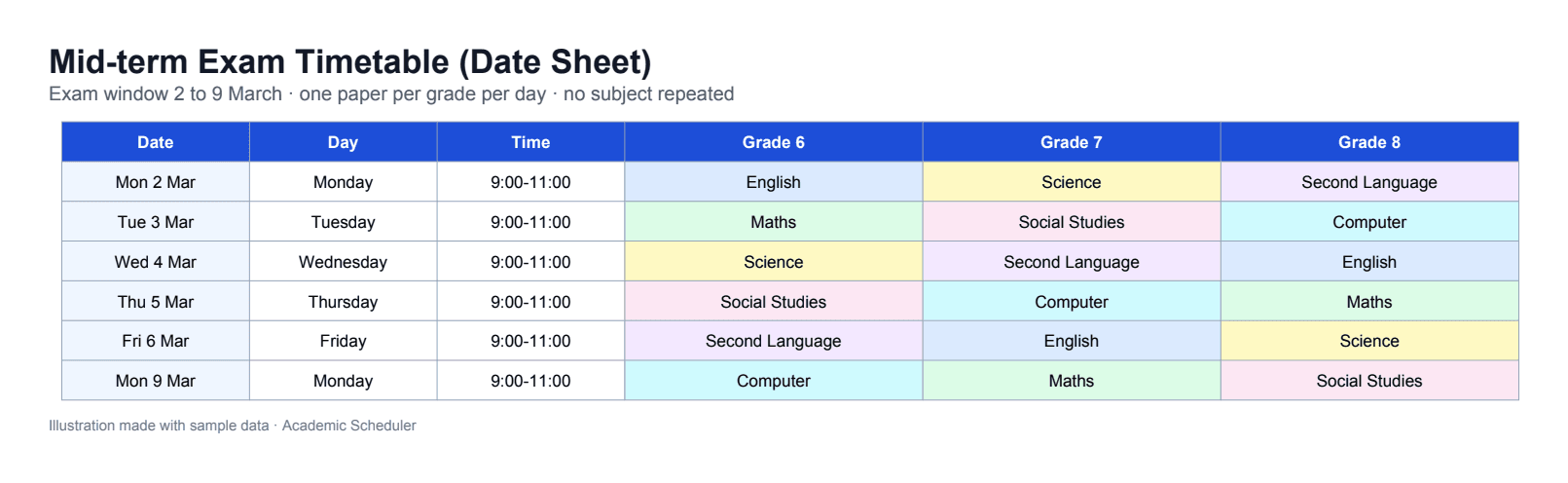
Exam timetable software plans when each class sits each paper during an exam period, often called a date sheet. It keeps every paper inside the exam dates, stops a subject being scheduled twice for the same class, and produces a printable timetable for students and parents.
In Academic Scheduler you create exam types such as Mid-term or Final with a start and end date, then pick each class's subjects for each exam day. A subject already scheduled for that class drops off its list, and the finished exam timetable downloads as a PDF. Each academic session keeps its own exams.
Why exam date sheets go wrong
A paper scheduled twice
In a big spreadsheet, a class can end up with the same subject on two days and another subject missing.
Dates outside the window
Papers drift outside the official exam period after a few edits.
Every class different
Each class has its own subjects, so one generic grid doesn't work.
Messy printouts
Students and parents get a cramped, hard-to-read date sheet.
Exam timetables made simple
Exam types with date ranges
Create each exam (for example Mid-term or Final) with its start and end date. Exam days can only be chosen inside that range.
- Any number of exam types
- Start and end dates per exam
- Exam days limited to the range
Each class's own subjects, no repeats
For each exam day you choose from that class's own subjects. Once a subject is scheduled for a class, it drops off the list so it can't be scheduled twice.
- Subjects taken from each class
- No subject scheduled twice per class
- Colour-coded subjects
Printable PDF date sheets
Download the exam timetable as a clean PDF to print, post on the notice board or share with parents.
- PDF download
- Easy to read for students and parents
Kept with each academic year
Exams belong to an academic session, so this year's exams stay separate from last year's and past years remain read-only.
- Separate exams per session
- Past sessions read-only
Create an exam timetable in four steps
- 1
Create the exam
Add an exam type such as Mid-term with its start and end dates.
- 2
Pick a class
Open the exam timetable for a class; its own subjects are listed.
- 3
Schedule papers
Choose a subject for each exam day; scheduled subjects drop off the list.
- 4
Download the PDF
Download the colour-coded exam timetable and share it.
Spreadsheet vs exam timetable software
| Task | Spreadsheet | Academic Scheduler |
|---|---|---|
| Same subject twice | Easy to miss | Scheduled subjects drop off the list |
| Exam dates | Typed by hand | Limited to the exam's date range |
| Subjects per class | One generic grid | Each class's own subjects |
| Printable date sheet | Re-formatted every time | One-click PDF |
Is it right for you?
A great fit if you…
- run mid-term and final exams for many classes
- want each class's date sheet without repeated subjects
- need a clean, printable PDF for students and parents
- already plan your weekly timetable in Academic Scheduler
Not the right tool if you need…
- invigilator (proctor) assignment
- exam hall or seating plans
- marks, grading or report cards
Frequently Asked Questions
More solutions
Publish this term's date sheet today
Create your exams, schedule every class's papers without repeats, and download the PDF. Free for 14 days.
14-day free trial · No credit card · Cancel anytime