Master Schedule Software for K-12 Schools
Build your whole-school master schedule online: every class, teacher and subject across the week, with teacher clashes blocked and teacher schedules generated for you.
Used by 350+ schools and institutions · 14-day free trial · No credit card
What does master schedule software do?
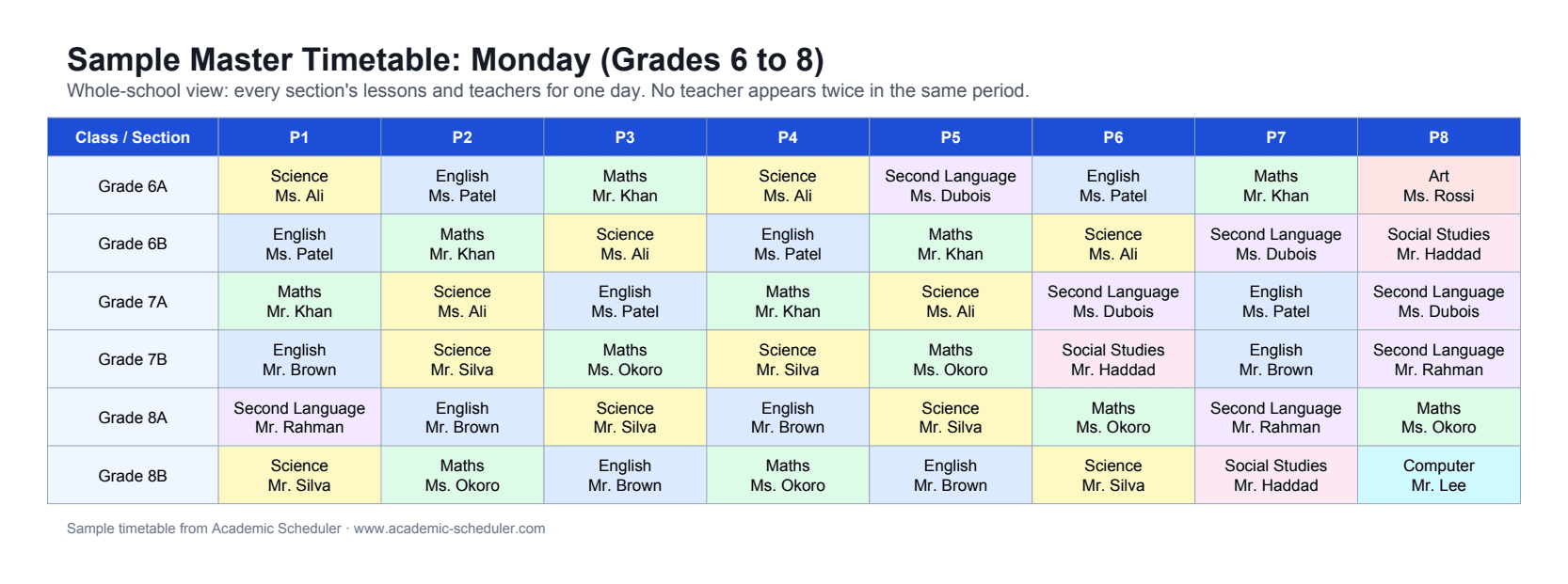
A master schedule is the school's complete plan of who teaches what, to which class, in which period, across the week. Master schedule software builds that plan online, checks every placement against the rest of the schedule, and turns it into individual class and teacher schedules.
Academic Scheduler is a section-based online master scheduler: you build the master schedule class by class, the app blocks teacher double-booking and tracks weekly lessons per subject, and every teacher's schedule follows automatically. It doesn't place individual students into elective course requests; for fixed classes and sections, that keeps it fast and simple.
Why master scheduling takes weeks
Shared teachers
Teachers who cover several grades make every change ripple across the whole schedule.
Lesson targets
Each section needs the right number of periods per subject, and spreadsheets don't count for you.
Late staffing changes
A new hire or resignation in August means re-checking dozens of placements.
No single source of truth
Counsellors, teachers and parents end up with different versions.
A master schedule builder that keeps up with change
Build the master schedule section by section
Open any class or section and fill its week. Teachers already booked elsewhere are greyed out, and every subject shows how many of its weekly periods are used, so the master schedule stays balanced as it grows.
- Teacher double-booking blocked
- Weekly period targets per subject
- Teacher subject and availability rules
AI help for the gaps
Ask the AI to fill a section's empty periods in plain English. It follows the same clash and subject-limit rules, never overwrites existing lessons, and waits for your review before saving.
- Fills empty periods only
- Same rules as manual editing
- Review before anything is saved
Teacher schedules and daily view, automatically
Every teacher's weekly schedule comes straight from the master schedule. The daily view shows the whole school's day, class-wise or teacher-wise, in a horizontal or vertical layout.
- Teacher schedules always in sync
- Whole-school daily view
- Colour filter and search
Cover absent teachers in minutes
Pick the absent teacher and the day. For each of their periods you see which teachers are free, with teachers of the same subject highlighted, and you can email the chosen substitute the class, subject, day and period in one click.
- Free teachers listed period by period
- Same-subject teachers highlighted first
- One-click email to the substitute
Share, print and export
Send every teacher and class a password-protected live link or QR code that always shows the latest timetable, or download a print-ready PDF or an editable Excel file.
- Password-protected, read-only share links and QR codes
- PDF (A4 landscape) and Excel (.xlsx) downloads
- Class-wise and teacher-wise views, horizontal or vertical
One workspace per academic year
Each academic session (for example 2026-27) keeps its own classes, teachers, subjects and timetables. Start the new year by copying last year's setup, and past years stay safe and read-only.
- Copy last year's setup in minutes
- Past sessions kept read-only for reference
- Switch between sessions any time
How to build a master schedule online
- 1
Define the bell schedule
Add your periods and breaks for each school day.
- 2
Add teachers and subjects
Record what each teacher can teach and when they're available.
- 3
Set section requirements
Give each class or section its subjects, teachers and weekly periods.
- 4
Build, review, publish
Fill each section by hand or with AI, check the daily view, then share live links.
Spreadsheet vs online master scheduler
| Task | Spreadsheet | Academic Scheduler |
|---|---|---|
| Teacher double-booking | Checked manually across tabs | Blocked as you place a lesson |
| Periods per subject | Formulas you maintain | Live count per section |
| Teacher schedules | Copied out by hand | Generated from the master schedule |
| Mid-year changes | Risky edits, new file versions | Edit once, everyone's link updates |
| Next school year | Rebuild from scratch | Copy the setup into a new session |
Is it right for you?
A great fit if you…
- schedule fixed classes or sections (elementary, middle, or high school with set groups)
- want teacher schedules generated from one master schedule
- need the schedule online and shareable
- rebuild the schedule every year and want to reuse last year's setup
Not the right tool if you need…
- placing individual students into elective course requests
- room and lab assignment
- syncing with a student information system (SIS)
Frequently Asked Questions
More solutions
Build next year's master schedule online
Start free, set up your sections, and see teacher clashes disappear as you build.
14-day free trial · No credit card · Cancel anytime