
Teacher lesson preparation spills past the bell: a sponsored Decksy survey of 1,036 U.S. teachers shows 71% prep slides after hours and where AI saves time.
Teacher Lesson Preparation: What a Survey of 1,036 Teachers Found
When does a teacher's workday actually end? Is it when the final bell rings, or hours later, after adjusting slides, finding visuals, and building worksheets at the kitchen table? A new study of teacher lesson preparation suggests the answer, for most teachers, is "later than you think."
Decksy surveyed 1,036 full-time and part-time U.S. teachers to examine the hidden workload behind presentation prep and the role of AI models in streamlining it. The headline finding: 71% of educators prepare lesson presentations outside scheduled working hours at least sometimes.
What Are the Key Findings of the Study?
How Many Lesson Presentations Do Teachers Prepare Each Week?
For many teachers, making a presentation is not a task reserved for the start of a unit. 70% of respondents create or substantially update at least three lesson presentations in a typical week, while 14% work on eleven or more.
The time required adds up. About half of the teachers surveyed spend at least an hour preparing a single presentation, and that time accumulates before any other resources are considered.
Do Teachers Prepare Lessons Outside Working Hours?
According to the survey, 71% of teachers prepare lessons beyond working hours, sometimes or often. Only 22% said they do all of this work during regular working hours.
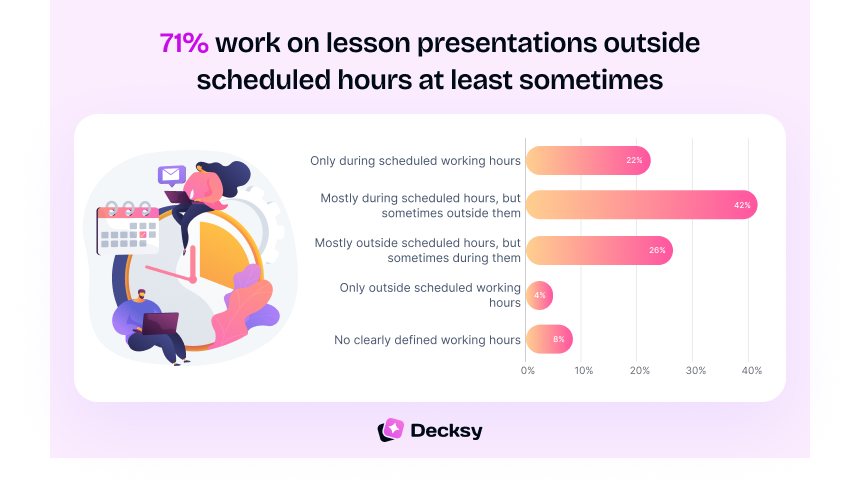
This does not mean every teacher prepares in the evening. The largest group, 42%, does it mostly within working hours but sometimes prepares slides for the next day after hours.
Why "sometimes" still matters
The issue is important even if it happens only occasionally, because occasional after-hours prep tends to become a habit. Any serious effort to reduce teacher workload has to account for it.
What Is the Most Time-Consuming Part of Lesson Planning?
It may be natural to assume that design elements such as layouts, fonts, and pictures take up the most time. That is not what teachers' responses reveal.
58% said organizing the sequence of the lesson was one of the most time-consuming parts of creating a presentation. Content creation followed closely at 56%.
Structuring a lesson requires a teacher to arrange concepts in a logical order, determine the prerequisite knowledge students need, and add examples and checks for understanding. That is professional judgment, not formatting.
What Do Teachers Create After the Slides Are Finished?
The work continues after the deck is done. According to the survey, most educators go on to build supporting materials:
| Supporting material | Share of teachers who create it |
|---|---|
| Worksheets | 59% |
| Handouts | 46% |
| Quizzes / exams | 44% |
| Homework / follow-up activities | 33% |
| Speaker notes | 32% |
Multiple selections were possible. Source: Decksy survey of 1,036 U.S. teachers.
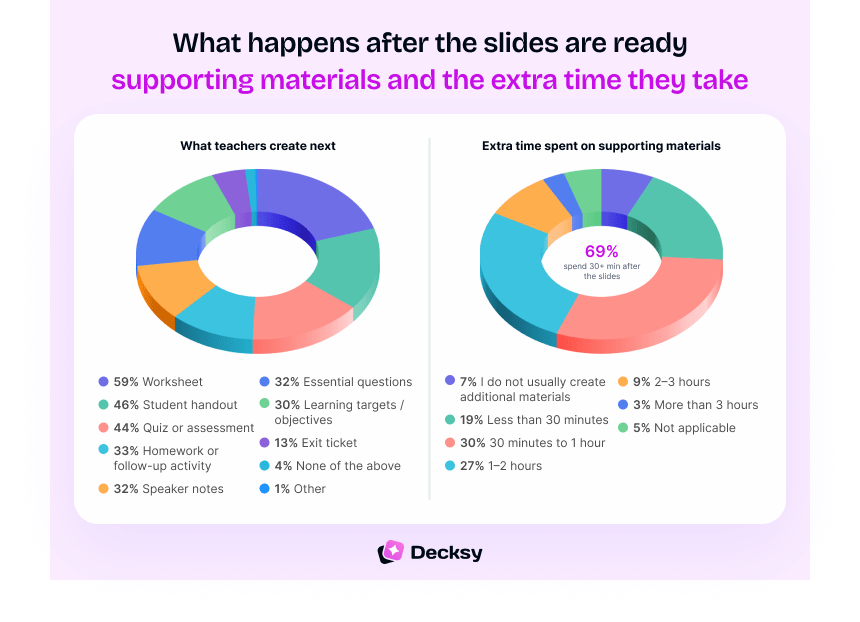
69% of educators spend an additional 30 minutes or more creating these materials. Because slides are the most visible part of the work, these numbers are easy to overlook. Yet it is the exercises, assessment questions, and follow-up activities that help students practice and demonstrate what they have learned.
💡 Pro tip: link the deck to its materials
An efficient EdTech workflow links presentations to their supporting materials rather than treating every worksheet, quiz, and handout as a separate task built from scratch.
Do Teachers Trust AI-Generated Lesson Content?
Trust remains one of the most evident barriers to AI adoption. 41% of participants said they would not trust the accuracy of AI-provided information without reviewing the output themselves. Only 12% said they would trust it without further review.
Notably, 54% of teachers who use AI said they use it to check the accuracy of lesson materials. That does not make AI a reliable source of truth.
⚠ Use AI for the first draft, not the final word
The recommended approach is to use AI to create a first draft, then independently verify the facts, references, examples, and overall educational value of the material before it reaches students.
The need for critical AI skills extends beyond teachers. An EduBirdie study on Gen Z found that 48% consider effective AI prompting a sign of intelligence. But knowing how to verify AI-generated information is just as important as knowing how to use it.
How Much Time Does AI Save Teachers?
Among teachers who use AI, 82% save at least an hour a week, and more than a third (37%) save three hours or more.
The data suggests AI can be effective for recurring weekly preparation: outlining material, organizing content, creating exercises, or producing a preliminary lesson that the teacher then polishes.
But time saved says nothing about whether the generated lesson is factually correct, age-appropriate, or aligned with learning goals. Those remain questions for professionals.
What Would Teachers Do With Two Extra Hours?
Asked how they would use two hours saved through AI-assisted preparation, 43% chose spending more time giving students individual attention.
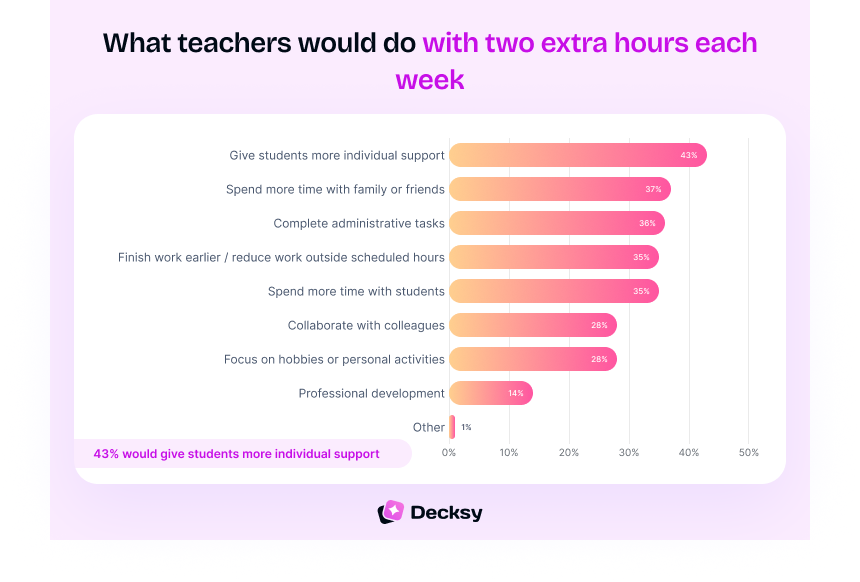
That response reframes the value of faster slide creation. One-to-one explanations, targeted feedback, and support for struggling learners are not easily replaced by automation. Others said they would finish administrative work or reclaim personal time.
Common Misconceptions About Teacher Lesson Preparation
"Slide design is what takes the most time."
Teachers point to lesson structure (58%) and content creation (56%) as the biggest time sinks, not layouts and fonts.
"Presentations are built once, at the start of a unit."
70% create or significantly update three or more presentations every week. Prep is a constant load, not a one-off.
"Once the slides are done, the lesson is ready."
Most teachers then build worksheets, handouts, or quizzes, and 69% spend another 30+ minutes doing so.
"Faster with AI means finished with AI."
Time saved does not guarantee accuracy or fit. Teachers keep responsibility for checking what AI produces.
Frequently Asked Questions
The Bottom Line
The presentation on the screen is the easiest part of lesson planning to see. Behind it sits the rest: organization, information, graphics, fact-checking, adaptation, exercises, tests, and the extra time that preparation takes beyond class hours.
AI tools are already lightening some of this workload. But teachers are not handing over control of the learning process. They use technology to speed up specific parts of preparation while keeping ownership of accuracy and quality.
Methodology: Decksy surveyed 1,036 full-time and part-time U.S. teachers aged 23–65 through online panels using Random Device Engagement (RDE). Percentages were rounded to whole numbers, with multiple selections possible for applicable questions.
Sponsored content: This article was provided by Decksy. Academic Scheduler publishes sponsored research when it is relevant to teachers and school leaders; publication is not an endorsement of any product.
Give Teachers Back Time Where Their Week Starts: The Timetable
Prep time only exists if the schedule protects it. Academic Scheduler builds clash-free school timetables with balanced teacher loads, so free periods land where teachers can actually use them. See all timetabling features.
Start Your Free Trial →No credit card required · Works for schools of any size · Your first timetable in under an hour
About the author: Decksy is an AI presentation maker that helps teachers, professionals and teams turn notes, PDFs and documents into structured, ready-to-edit slide decks. The Decksy Research Team runs surveys on how educators prepare lessons and use AI, including this study of 1,036 full- and part-time U.S. teachers.
This is a sponsored post. It was reviewed by the Academic Scheduler editorial team before publishing.


